Successfully implementing batch management with SAP EWM
Batch management is a core component of modern warehouse logistics, particularly in industries with stringent compliance requirements such as food, pharmaceuticals, chemicals, and consumer goods. SAP Extended Warehouse Management (SAP EWM) enables the unambiguous identification, control, and traceability of batches across all warehouse processes. Companies benefit from enhanced quality assurance, clearly defined process flows, and efficient inventory management.

Transparent Batch Traceability
SAP EWM enables end‑to‑end tracking of batches across the entire material flow, from goods receipt through to goods issue.
Efficient Inventory Control
Strategies such as FIFO or FEFO support an optimal picking sequence, improve inventory quality, and ensure compliance with shelf‑life requirements.
High Process Reliability
System‑controlled batch decisions reduce errors, ensure compliance, and prevent incorrect picking processes.
What is the purpose of batch management in the warehouse?
Batch management is used to uniquely identify materials with identical characteristics and to trace them across the entire material flow. This identification makes it possible to consistently document information such as origin, minimum shelf life, or specific quality attributes. As a result, deviations, complaints, or recalls can be addressed quickly and in a targeted manner.
Why batch management with SAP EWM adds value
SAP EWM creates transparency across inventory, reduces potential sources of error, and increases overall process reliability. Batches can be automatically identified, evaluated, and controlled based on defined strategies such as FIFO or FEFO. At the same time, compliance with legal and regulatory requirements is supported by ensuring that only released batches are further processed or delivered.
How SAP EWM controls batch determination
Batch determination in SAP EWM is executed within core warehouse processes—typically during picking and goods issue.
SAP EWM considers the following aspects:
- predefined criteria such as FIFO, FEFO, expiration dates, or stock types
- selection classes from the ERP system
- physical warehouse conditions and strategic putaway and removal logic
SAP EWM automatically identifies the appropriate batch and ensures that only batch‑compliant materials are used.
These features are provided by SAP EWM for batch management
Batch master data in EWM
Batch master data is typically created in the ERP system and distributed to SAP EWM. Alternatively, batches can be created directly in SAP EWM, either manually or automatically.
Batch determination based on defined criteria
Selection criteria of an outbound delivery can be reviewed, adjusted, and applied during the picking process.
Batch determination of predefined batches
If specific batches are defined in the outbound delivery, SAP EWM uses exclusively these batches for picking.
Batch status management
SAP EWM distinguishes between the statuses unrestricted and restricted. New batches are unrestricted by default; status changes are carried out via QM usage decisions or manually.
Documentation batch
Documentation batches support traceability without inventory management and help reduce complexity. They are used when batch‑specific inventory management is not required.
Monitoring in the Warehouse Management Monitor
Batch and inventory data is displayed clearly and can be filtered according to specific characteristics.

Batches in Goods Receipt
The ERP system transfers batch information to SAP EWM as part of the inbound delivery. If batch master data already exists, it is referenced in SAP EWM. If not, SAP EWM creates the batch master record automatically or manually during goods receipt – either using a predefined batch number or a number range. Relevant attributes such as production date, minimum shelf life, or country of origin can be transferred during this process.
Batches in Goods Issue
Outbound deliveries in the ERP system often contain batch selection criteria, such as material color or density, which are transferred to SAP EWM.
During the picking process, SAP EWM performs batch determination based on the characteristics maintained in the selection class and considers:
- only suitable batches
- predefined batches
- alternative proposals for additional suitable batches if the required quantity is insufficient
- automatic validation of selection criteria (via SAP EWM customizing) in the case of manual entry
Practical example: Batch management from goods receipt to picking
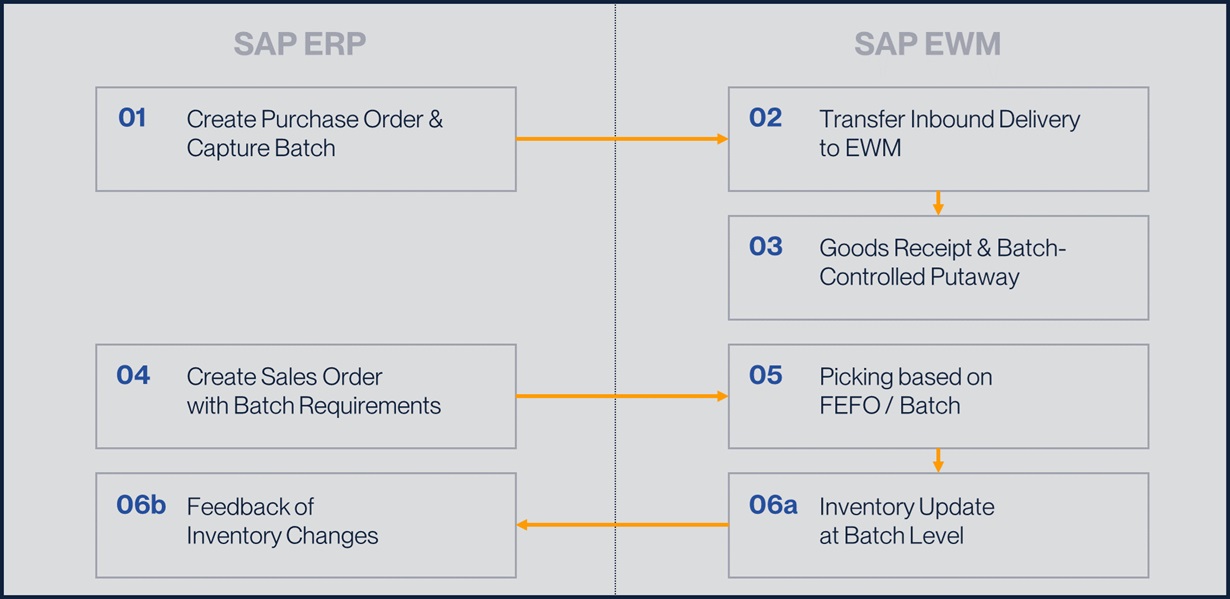
To illustrate the interaction between SAP ERP and SAP EWM in batch management, a typical end‑to‑end warehouse process is outlined below – from goods receipt through to outbound delivery.
1. Creation of the inbound delivery – batch creation in ERP
The process begins in SAP ERP with the creation of a purchase order. In this example, the material is subject to batch management, requiring a batch to be created or specified during document creation. Batch‑relevant information such as batch number, expiration date, and classification characteristics is captured. From a technical perspective, the ERP system is the leading instance for the batch. Inventory postings are made at batch level, and all relevant data is available for subsequent processes.
2. Transfer to SAP EWM – inventory representation in the warehouse
The inbound delivery is replicated to SAP EWM and created as a document. Goods receipt is executed in SAP EWM, where the batch becomes visible at EWM inventory level and can be processed further within warehouse operations.
3. Putaway – batch‑controlled storage bin determination
In the next step, inventory is put away. Putaway strategies take batch‑relevant criteria into account. For example, rules can be defined to determine whether different batches or expiration dates may be stored in the same storage bin. Putaway using the batch number is therefore transparent and fully traceable.
4. Customer order in SAP ERP – transfer of requirements
When a customer order is created in SAP ERP, batch‑relevant requirements such as FEFO or customer‑specific constraints are considered and transferred to SAP EWM. The ERP system defines from a business perspective which type of batch is to be delivered, while SAP EWM is responsible for operational execution.
5. Picking in SAP EWM – selection of the correct batch
SAP EWM creates picking tasks based on the transferred requirements. Removal strategies such as FEFO are applied, prioritizing the batch with the shortest remaining shelf life. Warehouse operators pick exactly the batch proposed by the system. Deviations are only possible to a limited extent or not at all, which significantly reduces errors.
6. Confirmation and inventory reconciliation
After picking is completed, warehouse movements are posted in SAP EWM. Inventory changes are automatically reported back to the ERP system. Inventory is synchronously updated at batch level in both systems.
At the end of the process, it is fully traceable at any time which batch was delivered, from which goods receipt it originated, and where it was previously stored in the warehouse.
Conclusion – Batch management in SAP EWM as a clear value driver for logistics
Batch management in SAP EWM provides structured, transparent, and efficient inventory control. Transparency, regulatory compliance, and end‑to‑end traceability strengthen quality across the entire logistics chain.
Companies benefit from stable warehouse operations, reduced risks, and increased process reliability. When implemented correctly, batch management in SAP EWM becomes a true competitive advantage and a key pillar of modern, future‑proof logistics.
FAQs
FAQ - Batch Management with SAP EWM
The functional ownership of batches is handled in SAP ERP. SAP EWM consumes batch information and uses it for operational warehouse control.
A batch is typically created during goods receipt, in production, or when a purchase order or inbound delivery is created.
Yes. SAP EWM can create and manage batches independently.
SAP EWM uses batch selection criteria based on characteristics transferred from SAP ERP. Physical warehouse constraints are also considered, including strategies such as FIFO or FEFO, batch inventory attributes, and system‑guided confirmations via mobile devices. This ensures that the correct batch is picked.
The expiration date is maintained in SAP ERP and transferred to SAP EWM. It is essential in SAP EWM, as it ensures product quality by controlling the picking sequence based on FEFO, preventing the picking of expired goods, validating remaining shelf life at goods receipt, and enabling traceability through the integration of production and expiration data.